A contact is a person. Each contact belongs to exactly one account.
Contacts
People at an account: the list, adding a contact, and the contact record.
Overview
Open the Contacts list
- Click Contacts in the left menu.
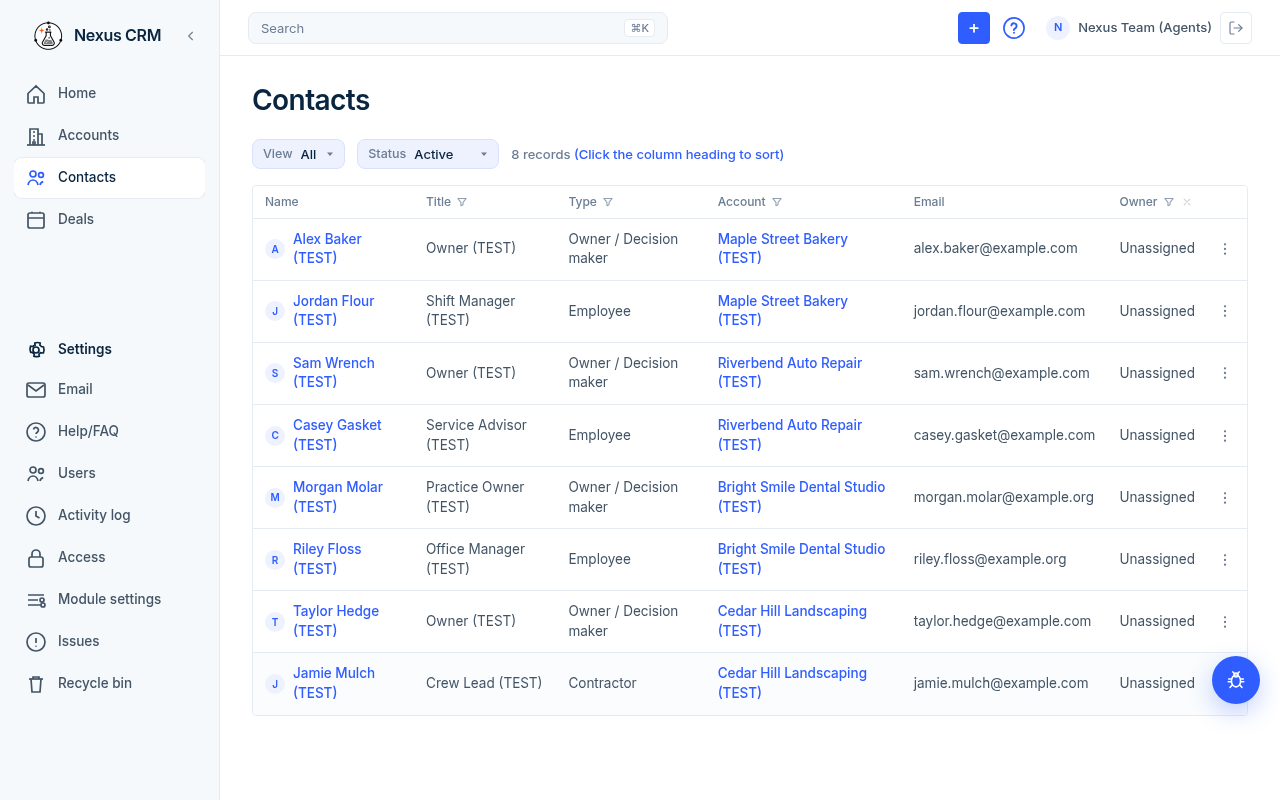
### Columns
| Column | What it shows |
|---|---|
| Name | The person's name and photo. |
| Title | Their job title. |
| Type | The kind of contact, for example Employee or Vendor / Supplier. |
| Account | The account they belong to. Click it to open the account. |
| Their email address. | |
| Owner | The Nexus user responsible for this contact. |
Click a row to open that contact.
### Filter the list
- Status above the table starts at Active. Change it to All, Inactive, or Archived to see others.
- Funnel icons on Title, Type, Account, and Owner.
- Clear filters puts Status back to Active.
See Find your way around for sorting and saved views.
If the list is empty you see "No contacts yet." and an Add contact button. If your filters hide every row you see "No contacts match your filters." and Clear filters.
Add a contact
- Click + in the top bar.
- Click Contact. The Add contact panel opens.
- Fill in the fields (see the table below).
- Click Add contact. Click Cancel to close without saving.
- Nexus opens the new contact.
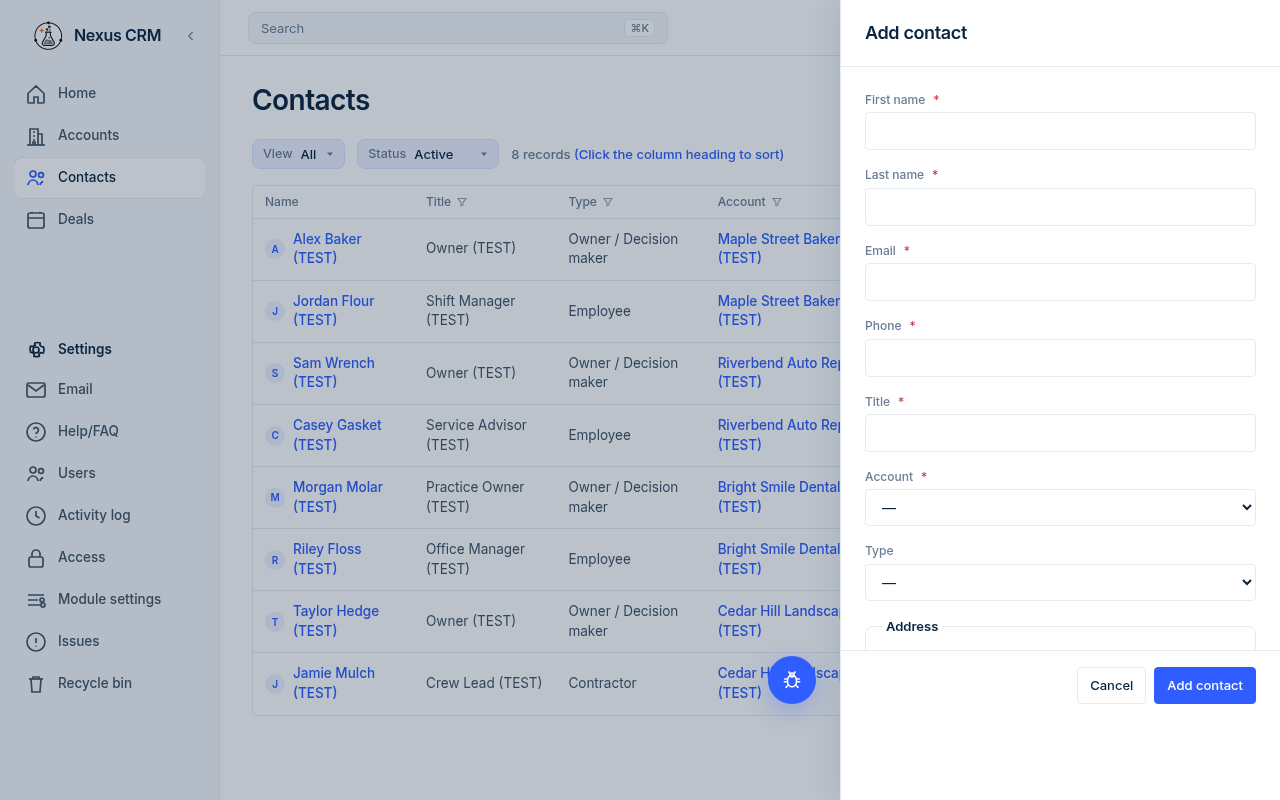
| Field | What to enter | Example | Required? |
|---|---|---|---|
| First name | The person's first name. | Jane | Yes |
| Last name | The person's last name. | Sample (TEST) | Yes |
| Their email. It must not already be used by another contact. | test@example.com | Yes | |
| Phone | A 10-digit US phone number. | (555) 010-0101 | Yes |
| Title | Their job title. | Office Manager | Yes |
| Account | Pick the account they work at. Only Active accounts are listed. | Acme Sample Co (TEST) | Yes |
| Type | Pick from the list, or leave as —. | Employee | No |
| Street (under Address) | Street address. | 123 Test Street | No |
| City | City. | Sampletown | No |
| State | Pick a US state. Starts on Ohio. | Ohio | No |
| ZIP | ZIP code. | 00000 | No |
| Country | Country. Starts as US. | US | No |
If something is missing, Nexus tells you at the bottom of the panel, for example "Title is required." or "Email already in use."
Phone must have 10 digits (a leading 1 is fine). Nexus saves it as (555) 010-0101.
The Type list comes from Settings → Module settings → Contacts. Only admins can change it.
The contact record
The title is the person's name. Under it is their account (click it to open the account). If they have no account you see "No account".
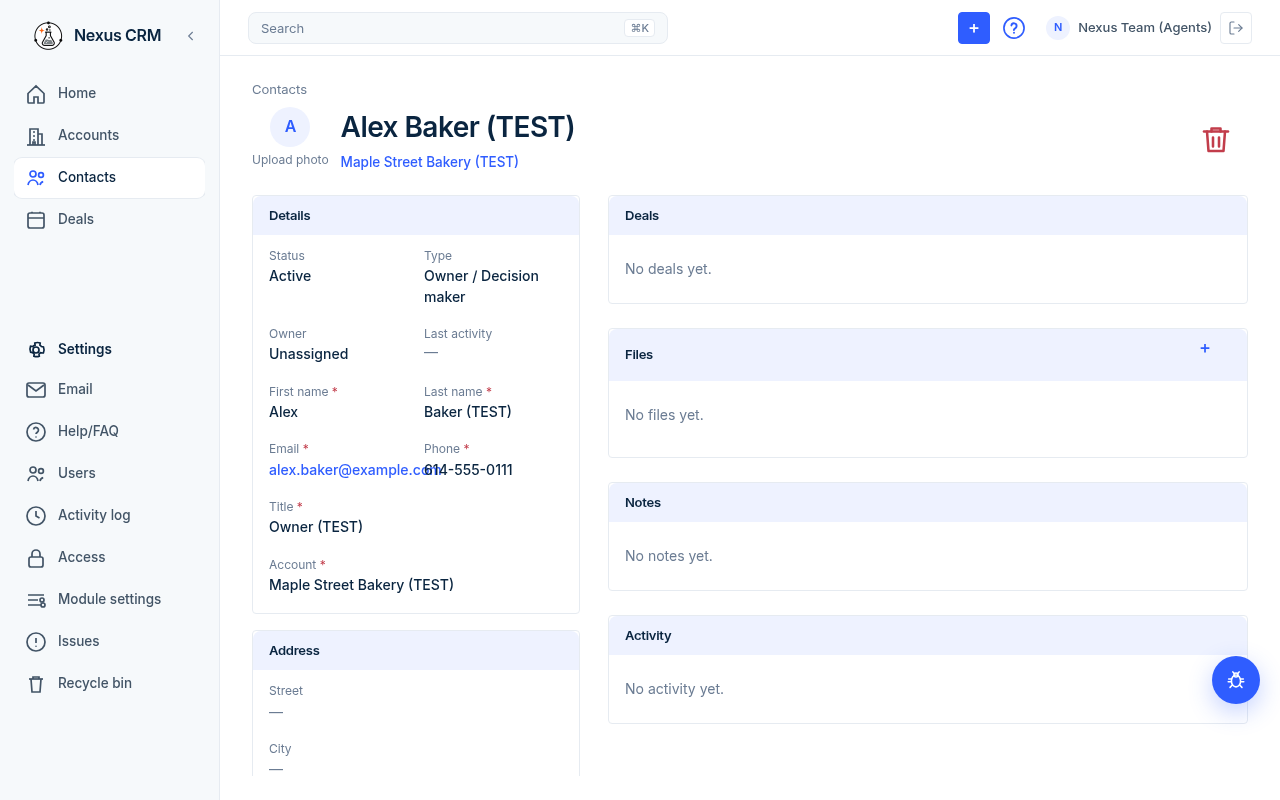
- Add a photo: click the round picture (hint: Upload photo) and pick an image.
- Delete: click the red trash icon (Delete contact), then Delete contact again to confirm.
### Details
Click a value to edit it. Click the check mark to save or the X to cancel.
| Field | What it is | Example | Required? |
|---|---|---|---|
| Status | Active, Inactive, or Archived. | Active | Yes |
| Type | Kind of contact. | Employee | No |
| Owner | The Nexus user responsible. | (your name) | Yes |
| Last activity | Date of the latest activity. You can't edit it. | Oct 1, 2026 | n/a |
| First name | First name. | Jane | Yes |
| Last name | Last name. | Sample (TEST) | Yes |
| Email address. Must be unique. | test@example.com | Yes | |
| Phone | 10-digit US phone. | (555) 010-0101 | Yes |
| Title | Job title. | Office Manager | Yes |
| Account | The account they belong to. | Acme Sample Co (TEST) | Yes |
Clicking the email address, or Email on the contact, opens compose. To is this person's email. Send uses a Gmail account you connected. See Email.
### Address
Street, City, State, ZIP, and Country. Click a value to change it.
### Right side of the record
| Card | What it holds |
|---|---|
| Deals | To follow: see Deals. |
| Files | Documents attached to this person. |
| Notes | Notes on this contact. Click + (Add note) on the card to add one. |
| Activity | Notes and meetings for this person, newest first. |
To add a note, click + (Add note) on the Notes card. You can also add a note, task, or meeting from + in the top bar while the contact is open. See Notes, tasks, meetings, and files.
Good to know
- A contact belongs to one account only.
- Two contacts can't share the same email.
- Contacts on Inactive or Archived accounts still exist, but you can't pick those accounts for a new contact.
- Deleting an account also deletes its contacts.